> ## Documentation Index
> Fetch the complete documentation index at: https://docs.tavus.io/llms.txt
> Use this file to discover all available pages before exploring further.
# Echo Mode
> Create your first echo PAL and start a conversation in seconds.
**Echo Mode** gives you full control over the face's speech by letting you bypass Tavus's core layers and supply your own input directly. There are two echo modes:
Echo Mode is incompatible with perception. As a result, we recommend using Tavus’s Full Pipeline in its entirety for the lowest latency and most optimized multimodal experience. Integrations like LiveKit Agent or Pipecat only provide rendering, while our Full Pipeline includes perception, turn-taking, and rendering for complete conversational intelligence.
### **Text or Audio (Base64) Echo**
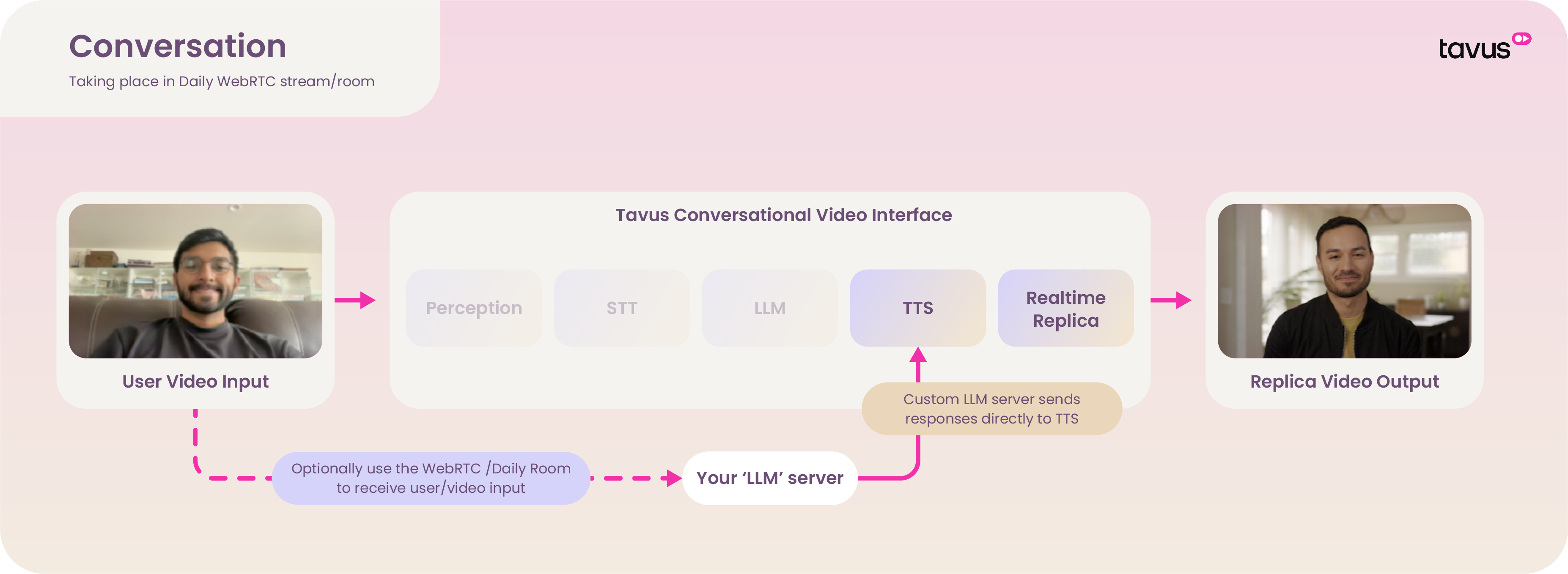 Microphone is disabled in the Transport layer.
* **Text Echo**
* Bypasses **Perception**, **STT**, and **LLM**
* Sends raw text directly to the **TTS Layer**
* Useful for manually scripted speech and interrupt control
* **Audio (Base64) Echo**
* Bypasses all layers except the **Realtime Replica Layer**
* Sends base64-encoded audio for direct playback by the face
Send text or base64 audio using the Interaction events.
### **Microphone Echo**
Microphone is disabled in the Transport layer.
* **Text Echo**
* Bypasses **Perception**, **STT**, and **LLM**
* Sends raw text directly to the **TTS Layer**
* Useful for manually scripted speech and interrupt control
* **Audio (Base64) Echo**
* Bypasses all layers except the **Realtime Replica Layer**
* Sends base64-encoded audio for direct playback by the face
Send text or base64 audio using the Interaction events.
### **Microphone Echo**
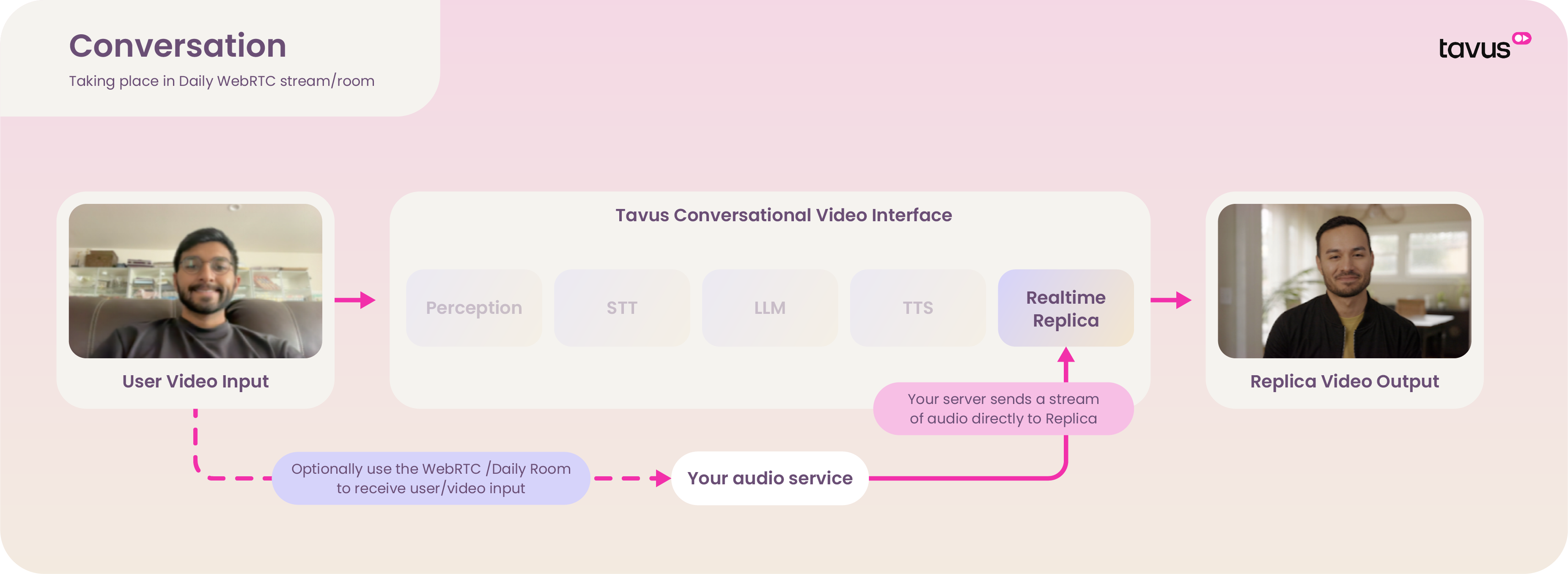 Microphone is enabled in the Transport layer.
* Bypasses all CVI layers (Perception, STT, LLM, TTS)
* Streams pre-generated audio directly into the face
* All interrupt logic must be embedded in your audio stream
## Echo Mode Quickstart
### Prerequisites
Before you begin, ensure the following dependencies are installed:
* `flask`
* `daily-python`
### Create an Echo Mode Conversation
Use the following request to create a PAL:
```shell cURL theme={null}
curl --request POST \
--url https://tavusapi.com/v2/pals \
--header 'Content-Type: application/json' \
--header 'x-api-key: ' \
--data '{
"pal_name": "Echo Assistant",
"pipeline_mode": "echo"
}'
```
Replace `` with your actual API key. You can generate one in the PAL Maker.
Create a conversation with your newly created `pal_id`:
```shell cURL theme={null}
curl --request POST \
--url https://tavusapi.com/v2/conversations \
--header 'Content-Type: application/json' \
--header 'x-api-key: ' \
--data '{
"pal_id": "",
"conversation_name": "Echo Test"
}'
```
* Replace `` with your actual API key.
* Replace `` with your newly created PAL ID.
Create a file named `script.py` and paste the following code:
```py [expandable] theme={null}
import sys
from flask import Flask, jsonify, request
from daily import CallClient, Daily, EventHandler
app = Flask(__name__)
# Global client instance
call_client = None
class RoomHandler(EventHandler):
def __init__(self):
super().__init__()
def on_app_message(self, message, sender: str) -> None:
print(f"Incoming app message from {sender}: {message}")
def join_room(url):
global call_client
try:
Daily.init()
handler = RoomHandler()
call_client = CallClient(event_handler=handler)
call_client.join(url)
print(f"Joined room: {url}")
except Exception as e:
print(f"Error joining room: {e}")
raise
@app.route("/send_text_message", methods=["POST"])
def send_text_message():
global call_client
if not call_client:
return jsonify({"error": "Not connected to a room"}), 400
try:
body = request.json
conversation_id = body.get("conversation_id")
properties = body.get("properties", {})
message = {
"message_type": "conversation",
"event_type": "conversation.echo",
"conversation_id": conversation_id,
"properties": {
"modality": properties.get("modality"),
"text": properties.get("text"),
"audio": properties.get("audio"),
"sample_rate": properties.get("sample_rate", 16000),
"inference_id": properties.get("inference_id"),
"done": properties.get("done")
}
}
call_client.send_app_message(message)
return jsonify({"status": "Message sent successfully"}), 200
except Exception as e:
return jsonify({"error": f"Failed to send message: {str(e)}"}), 500
if __name__ == "__main__":
if len(sys.argv) != 2:
print("Usage: python script.py ")
sys.exit(1)
conversation_url = sys.argv[1]
try:
join_room(conversation_url)
app.run(port=8000, debug=True)
except Exception as e:
print(f"Failed to start the application: {e}")
sys.exit(1)
```
This script starts a Flask app that connects to a Daily room and sends echo interaction messages to your PAL.
Run the script:
```sh theme={null}
python script.py
```
Replace `` with the URL returned when creating your conversation.
Send a POST request to your local server to trigger an echo message:
```sh cURL theme={null}
curl -X POST http://localhost:8000/send_text_message \
-H "Content-Type: application/json" \
-d '{
"message_type": "conversation",
"event_type": "conversation.echo",
"conversation_id": "",
"properties": {
"modality": "text",
"text": "Hello there!",
"audio": "base64-encoded-audio",
"sample_rate": 24000,
"inference_id": "inference-id-123",
"done": "true"
}
}'
```
Replace `` with your actual Conversation ID.
In this example, the PAL will respond by saying: “Hello there!”
Microphone is enabled in the Transport layer.
* Bypasses all CVI layers (Perception, STT, LLM, TTS)
* Streams pre-generated audio directly into the face
* All interrupt logic must be embedded in your audio stream
## Echo Mode Quickstart
### Prerequisites
Before you begin, ensure the following dependencies are installed:
* `flask`
* `daily-python`
### Create an Echo Mode Conversation
Use the following request to create a PAL:
```shell cURL theme={null}
curl --request POST \
--url https://tavusapi.com/v2/pals \
--header 'Content-Type: application/json' \
--header 'x-api-key: ' \
--data '{
"pal_name": "Echo Assistant",
"pipeline_mode": "echo"
}'
```
Replace `` with your actual API key. You can generate one in the PAL Maker.
Create a conversation with your newly created `pal_id`:
```shell cURL theme={null}
curl --request POST \
--url https://tavusapi.com/v2/conversations \
--header 'Content-Type: application/json' \
--header 'x-api-key: ' \
--data '{
"pal_id": "",
"conversation_name": "Echo Test"
}'
```
* Replace `` with your actual API key.
* Replace `` with your newly created PAL ID.
Create a file named `script.py` and paste the following code:
```py [expandable] theme={null}
import sys
from flask import Flask, jsonify, request
from daily import CallClient, Daily, EventHandler
app = Flask(__name__)
# Global client instance
call_client = None
class RoomHandler(EventHandler):
def __init__(self):
super().__init__()
def on_app_message(self, message, sender: str) -> None:
print(f"Incoming app message from {sender}: {message}")
def join_room(url):
global call_client
try:
Daily.init()
handler = RoomHandler()
call_client = CallClient(event_handler=handler)
call_client.join(url)
print(f"Joined room: {url}")
except Exception as e:
print(f"Error joining room: {e}")
raise
@app.route("/send_text_message", methods=["POST"])
def send_text_message():
global call_client
if not call_client:
return jsonify({"error": "Not connected to a room"}), 400
try:
body = request.json
conversation_id = body.get("conversation_id")
properties = body.get("properties", {})
message = {
"message_type": "conversation",
"event_type": "conversation.echo",
"conversation_id": conversation_id,
"properties": {
"modality": properties.get("modality"),
"text": properties.get("text"),
"audio": properties.get("audio"),
"sample_rate": properties.get("sample_rate", 16000),
"inference_id": properties.get("inference_id"),
"done": properties.get("done")
}
}
call_client.send_app_message(message)
return jsonify({"status": "Message sent successfully"}), 200
except Exception as e:
return jsonify({"error": f"Failed to send message: {str(e)}"}), 500
if __name__ == "__main__":
if len(sys.argv) != 2:
print("Usage: python script.py ")
sys.exit(1)
conversation_url = sys.argv[1]
try:
join_room(conversation_url)
app.run(port=8000, debug=True)
except Exception as e:
print(f"Failed to start the application: {e}")
sys.exit(1)
```
This script starts a Flask app that connects to a Daily room and sends echo interaction messages to your PAL.
Run the script:
```sh theme={null}
python script.py
```
Replace `` with the URL returned when creating your conversation.
Send a POST request to your local server to trigger an echo message:
```sh cURL theme={null}
curl -X POST http://localhost:8000/send_text_message \
-H "Content-Type: application/json" \
-d '{
"message_type": "conversation",
"event_type": "conversation.echo",
"conversation_id": "",
"properties": {
"modality": "text",
"text": "Hello there!",
"audio": "base64-encoded-audio",
"sample_rate": 24000,
"inference_id": "inference-id-123",
"done": "true"
}
}'
```
Replace `` with your actual Conversation ID.
In this example, the PAL will respond by saying: “Hello there!”