> ## Documentation Index
> Fetch the complete documentation index at: https://docs.tavus.io/llms.txt
> Use this file to discover all available pages before exploring further.
# Tool Calling for LLM
> Set up tool calling to trigger functions from user speech using Tavus-hosted or custom LLMs.
**LLM tool calling** works with OpenAI’s Function Calling and can be set up in the `llm` layer. It allows an AI agent to trigger functions based on user speech during a conversation.
Tavus does not execute tool calls on the backend. Use event listeners in your frontend to listen for [tool call events](/sections/event-schemas/conversation-toolcall) and run your own logic when a tool is invoked.
You can use tool calling with our **hosted models** or any **OpenAI-compatible custom LLM**.
## Defining Tool
### Top-Level Fields
| Field | Type | Required | Description |
| ---------- | ------ | -------- | -------------------------------------------------------------------------------------------------------- |
| `type` | string | ✅ | Must be `"function"` to enable tool calling. |
| `function` | object | ✅ | Defines the function that can be called by the LLM. Contains metadata and a strict schema for arguments. |
#### `function`
| Field | Type | Required | Description |
| ------------- | ------ | -------- | ---------------------------------------------------------------------------------------------------------------------------- |
| `name` | string | ✅ | A unique identifier for the function. Must be in `snake_case`. The model uses this to refer to the function when calling it. |
| `description` | string | ✅ | A natural language explanation of what the function does. Helps the LLM decide when to call it. |
| `parameters` | object | ✅ | A JSON Schema object that describes the expected structure of the function’s input arguments. |
#### `function.parameters`
| Field | Type | Required | Description |
| ------------ | ---------------- | -------- | ----------------------------------------------------------------------------------------- |
| `type` | string | ✅ | Always `"object"`. Indicates the expected input is a structured object. |
| `properties` | object | ✅ | Defines each expected parameter and its corresponding type, constraints, and description. |
| `required` | array of strings | ✅ | Specifies which parameters are mandatory for the function to execute. |
Each parameter should be included in the required list, even if they might seem optional in your code.
##### `function.parameters.properties`
Each key inside `properties` defines a single parameter the model must supply when calling the function.
| Field | Type | Required | Description |
| ------------------ | ------ | -------- | ------------------------------------------------------------------------------------------- |
| `` | object | ✅ | Each key is a named parameter (e.g., `location`). The value is a schema for that parameter. |
Optional subfields for each parameter:
| Subfield | Type | Required | Description |
| ------------- | ------ | -------- | ------------------------------------------------------------------------------------------- |
| `type` | string | ✅ | Data type (e.g., `string`, `number`, `boolean`). |
| `description` | string | ❌ | Explains what the parameter represents and how it should be used. |
| `enum` | array | ❌ | Defines a strict list of allowed values for this parameter. Useful for categorical choices. |
## Example Configuration
Here’s an example of tool calling in the `llm` layers:
**Best Practices:**
* Use clear, specific function names to reduce ambiguity.
* Add detailed `description` fields to improve selection accuracy.
```json LLM Layer [expandable] theme={null}
"llm": {
"model": "tavus-gpt-oss",
"tools": [
{
"type": "function",
"function": {
"name": "get_current_time",
"description": "Fetch the current local time for a specified location",
"parameters": {
"type": "object",
"properties": {
"location": {
"type": "string",
"description": "The name of the city or region, e.g. New York, Tokyo"
}
},
"required": ["location"]
}
}
},
{
"type": "function",
"function": {
"name": "convert_time_zone",
"description": "Convert time from one time zone to another",
"parameters": {
"type": "object",
"properties": {
"time": {
"type": "string",
"description": "The original time in ISO 8601 or HH:MM format, e.g. 14:00 or 2025-05-28T14:00"
},
"from_zone": {
"type": "string",
"description": "The source time zone, e.g. PST, EST, UTC"
},
"to_zone": {
"type": "string",
"description": "The target time zone, e.g. CET, IST, JST"
}
},
"required": ["time", "from_zone", "to_zone"]
}
}
}
]
}
```
## How Tool Calling Works
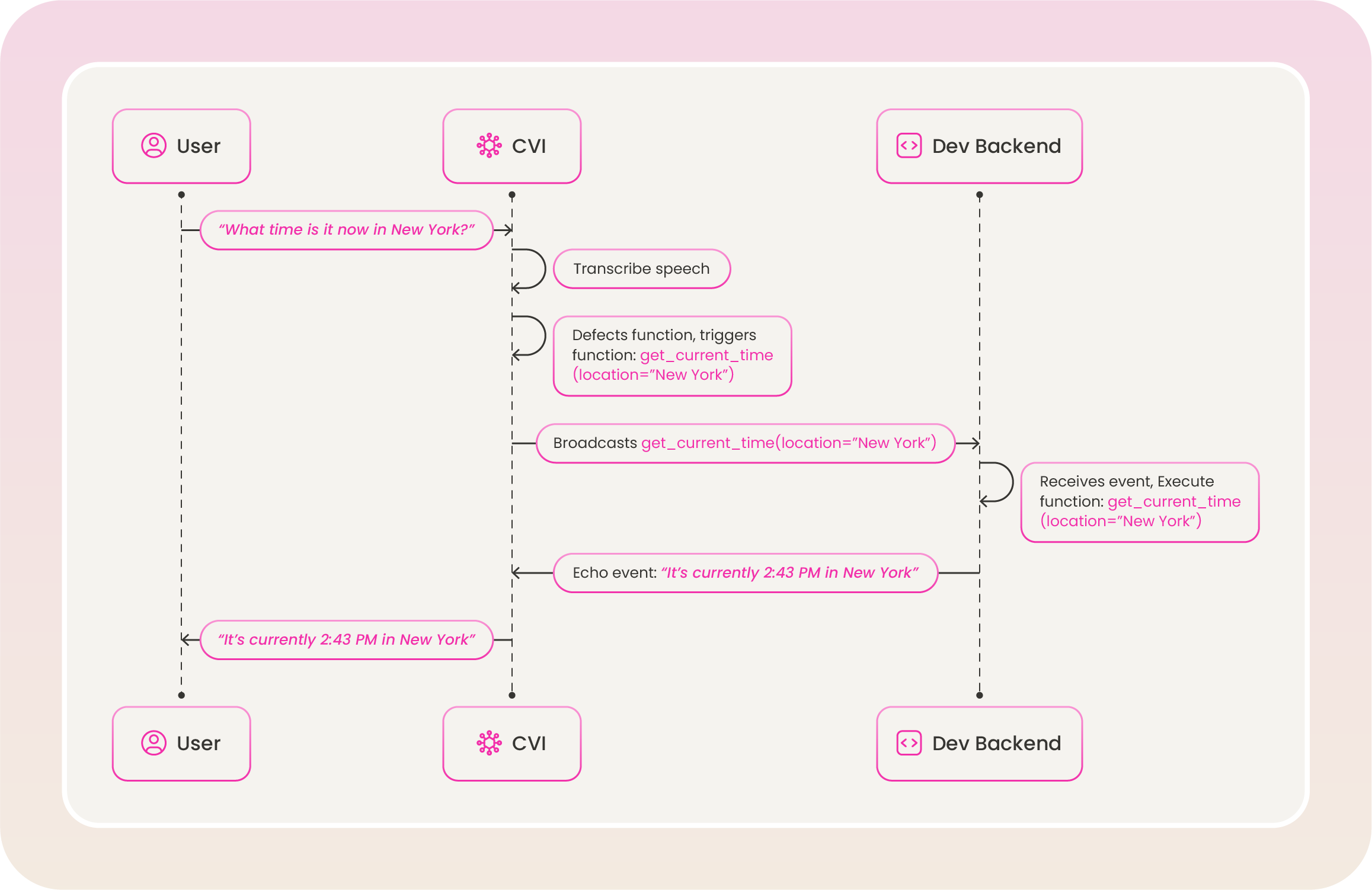
Tool calling is triggered during an active conversation when the LLM model needs to invoke a function. Here’s how the process works:
This example explains the `get_current_time` function from the [example configuration](#example-configuration) above.
 ## Modify Existing Tools
You can update `tools` definitions using the Update Persona API.
```shell [expandable] theme={null}
curl --request PATCH \
--url https://tavusapi.com/v2/personas/{persona_id} \
--header 'Content-Type: application/json' \
--header 'x-api-key: ' \
--data '[
{
"op": "replace",
"path": "/layers/llm/tools",
"value": [
{
"type": "function",
"function": {
"name": "get_current_weather",
"description": "Get the current weather in a given location",
"parameters": {
"type": "object",
"properties": {
"location": {
"type": "string",
"description": "The city and state, e.g. San Francisco, CA"
},
"unit": {
"type": "string",
"enum": ["celsius", "fahrenheit"]
}
},
"required": ["location", "unit"]
}
}
}
]
}
]'
```
Replace `` with your actual API key. You can generate one in the Developer Portal.
## Modify Existing Tools
You can update `tools` definitions using the Update Persona API.
```shell [expandable] theme={null}
curl --request PATCH \
--url https://tavusapi.com/v2/personas/{persona_id} \
--header 'Content-Type: application/json' \
--header 'x-api-key: ' \
--data '[
{
"op": "replace",
"path": "/layers/llm/tools",
"value": [
{
"type": "function",
"function": {
"name": "get_current_weather",
"description": "Get the current weather in a given location",
"parameters": {
"type": "object",
"properties": {
"location": {
"type": "string",
"description": "The city and state, e.g. San Francisco, CA"
},
"unit": {
"type": "string",
"enum": ["celsius", "fahrenheit"]
}
},
"required": ["location", "unit"]
}
}
}
]
}
]'
```
Replace `` with your actual API key. You can generate one in the Developer Portal.