> ## Documentation Index
> Fetch the complete documentation index at: https://docs.tavus.io/llms.txt
> Use this file to discover all available pages before exploring further.
# Tool Calling for Perception
> Configure tool calling with Raven to trigger functions from visual or audio input.
**Perception tool calling** works with OpenAI’s Function Calling and can be configured in the `perception` layer. It allows an AI agent to trigger functions based on **visual** or **audio** cues during a conversation.
You define two separate tool sets in the perception layer:
* **Visual tools** — `visual_tool_prompt` and `visual_tools`: triggered when Raven detects something in the video stream (e.g., an ID card, bright outfit, hat).
* **Audio tools** — `audio_tool_prompt` and `audio_tools`: triggered when Raven detects something in the audio stream (e.g., sarcasm, frustration).
For how to set these up in the perception layer, see [Perception](/sections/conversational-video-interface/persona/perception#visual-perception-configuration) (visual) and [Perception — Audio Perception Configuration](/sections/conversational-video-interface/persona/perception#audio-perception-configuration-raven-1) (audio).
The perception layer tool calling is only available for Raven.
Tavus does not execute tool calls on the backend. Use event listeners in your frontend to listen for [perception tool call events](/sections/event-schemas/conversation-perception-tool-call) and run your own logic when a tool is invoked. Each event includes a `modality` field (`"vision"` or `"audio"`) so you can handle visual and audio tool calls differently.
## Defining Tool
### Top-Level Fields
| Field | Type | Required | Description |
| ---------- | ------ | -------- | ---------------------------------------------------------------------------------------------------------- |
| `type` | string | ✅ | Must be `"function"` to enable tool calling. |
| `function` | object | ✅ | Defines the function that can be called by the model. Contains metadata and a strict schema for arguments. |
#### `function`
| Field | Type | Required | Description |
| ------------- | ------ | -------- | ---------------------------------------------------------------------------------------------------------------------------- |
| `name` | string | ✅ | A unique identifier for the function. Must be in `snake_case`. The model uses this to refer to the function when calling it. |
| `description` | string | ✅ | A natural language explanation of what the function does. Helps the perception model decide when to call it. |
| `parameters` | object | ✅ | A JSON Schema object that describes the expected structure of the function’s input arguments. |
#### `function.parameters`
| Field | Type | Required | Description |
| ------------ | ---------------- | -------- | ----------------------------------------------------------------------------------------- |
| `type` | string | ✅ | Always `"object"`. Indicates the expected input is a structured object. |
| `properties` | object | ✅ | Defines each expected parameter and its corresponding type, constraints, and description. |
| `required` | array of strings | ✅ | Specifies which parameters are mandatory for the function to execute. |
Each parameter should be included in the required list, even if they might seem optional in your code.
##### `function.parameters.properties`
Each key inside `properties` defines a single parameter the model must supply when calling the function.
| Field | Type | Required | Description |
| ------------------ | ------ | -------- | ------------------------------------------------------------------------ |
| `` | object | ✅ | Each key is a named parameter. The value is a schema for that parameter. |
Optional subfields for each parameter:
| Subfield | Type | Required | Description |
| ------------- | ------ | -------- | ------------------------------------------------------------------------------------------- |
| `type` | string | ✅ | Data type (e.g., `string`, `number`, `boolean`). |
| `description` | string | ❌ | Explains what the parameter represents and how it should be used. |
| `maxLength` | number | ❌ | Maximum character length for string parameters. Must not exceed 1,000. |
| `enum` | array | ❌ | Defines a strict list of allowed values for this parameter. Useful for categorical choices. |
All Raven API parameters (queries, prompts, tool definitions, etc.) have a **1,000 character limit** per entry. Entries exceeding this limit will cause an exception.
## Example Configuration
Here are examples of tool calling in the `perception` layer. Visual tools use `visual_tool_prompt` and `visual_tools`; audio tools use `audio_tool_prompt` and `audio_tools`. See [Perception](/sections/conversational-video-interface/persona/perception) for full setup details.
**Best Practices:**
* Use clear, specific function names to reduce ambiguity.
* Add detailed `description` fields to improve selection accuracy.
### Visual tools example
```json Perception Layer — visual tools [expandable] theme={null}
"perception": {
"perception_model": "raven-1",
"visual_awareness_queries": [
"Is the user showing an ID card?",
"Is the user wearing a bright outfit?"
],
"visual_tool_prompt": "You have a tool to notify the system when an ID card is detected, named `notify_if_id_shown`. You have another tool to notify when a bright outfit is detected, named `notify_if_bright_outfit_shown`.",
"visual_tools": [
{
"type": "function",
"function": {
"name": "notify_if_id_shown",
"description": "Use this function when a drivers license or passport is detected in the image with high confidence. After collecting the ID, internally use final_ask()",
"parameters": {
"type": "object",
"properties": {
"id_type": {
"type": "string",
"description": "best guess on what type of ID it is",
"maxLength": 1000
},
},
"required": ["id_type"],
},
},
},
{
"type": "function",
"function": {
"name": "notify_if_bright_outfit_shown",
"description": "Use this function when a bright outfit is detected in the image with high confidence",
"parameters": {
"type": "object",
"properties": {
"outfit_color": {
"type": "string",
"description": "Best guess on what color of outfit it is",
"maxLength": 1000
}
},
"required": ["outfit_color"]
}
}
}
]
}
```
### Audio tools example
```json Perception Layer — audio tools [expandable] theme={null}
"perception": {
"perception_model": "raven-1",
"audio_tool_prompt": "You have a tool to notify when sarcasm is detected, named `notify_sarcasm_detected`. Use it when the user's tone indicates sarcasm.",
"audio_tools": [
{
"type": "function",
"function": {
"name": "notify_sarcasm_detected",
"description": "Call this when the user's tone or phrasing suggests sarcasm",
"parameters": {
"type": "object",
"properties": {
"reason": {
"type": "string",
"description": "Why you detected sarcasm (e.g. what the user said)",
"maxLength": 1000
}
},
"required": ["reason"]
}
}
}
]
}
```
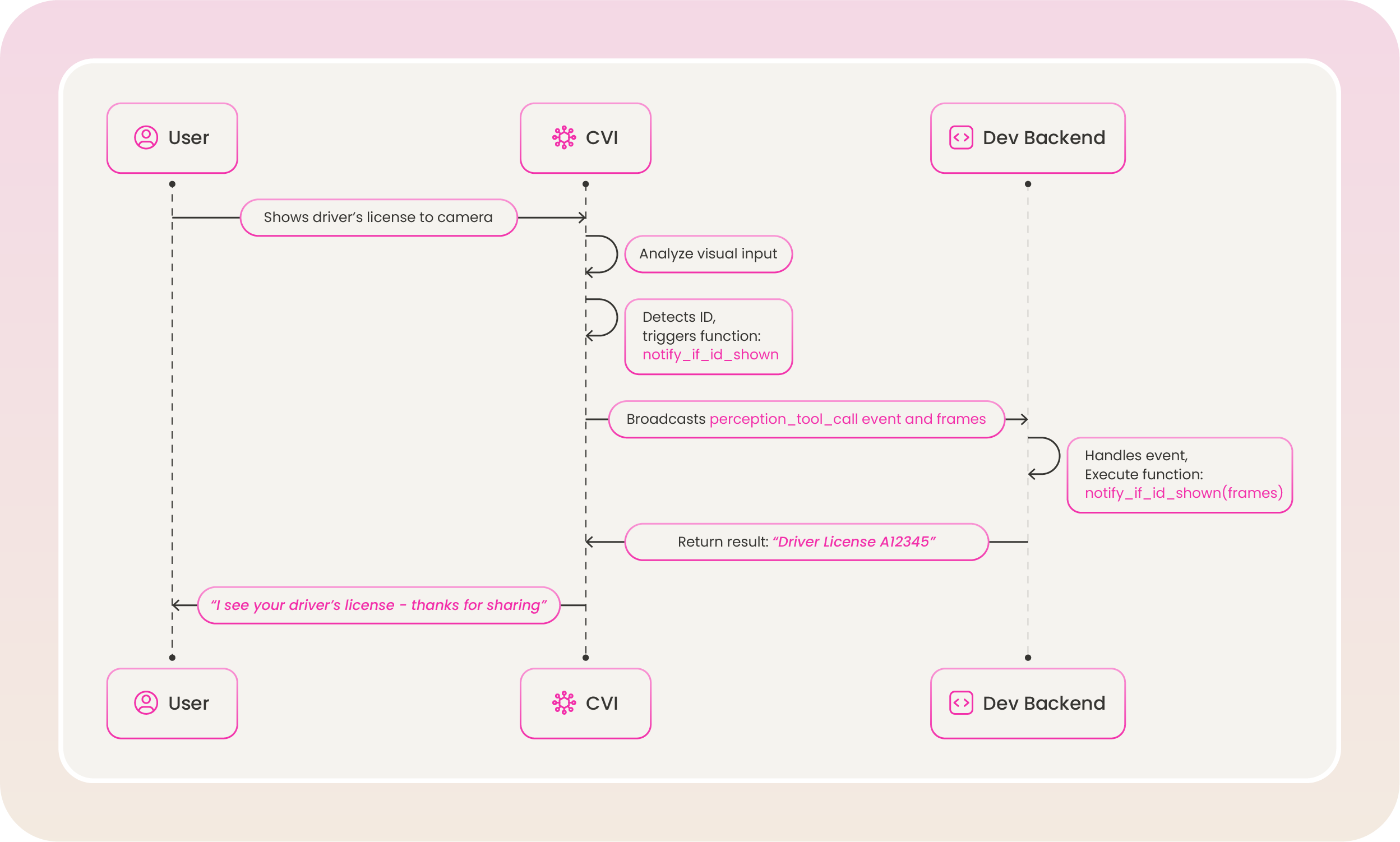
## How Perception Tool Calling Works
Perception tool calling is triggered during an active conversation when the perception model detects a cue that matches a defined function:
* **Visual tools** are triggered by what Raven sees (e.g., ID card, bright outfit, hat). The event includes a `modality` of `"vision"`, structured `arguments`, and a `frames` array of base64-encoded images that triggered the call.
* **Audio tools** are triggered by what Raven hears (e.g., sarcasm, frustration). The event includes a `modality` of `"audio"` and `arguments` (often a JSON string).
The same process applies to any function you define in `visual_tools` or `audio_tools`—e.g. `notify_if_bright_outfit_shown` when a bright outfit is visually detected, or `notify_sarcasm_detected` when sarcasm is detected in speech.
 ## Modify Existing Tools
You can update `visual_tools` or `audio_tools` using the Update Persona API. Use the path `/layers/perception/visual_tools` or `/layers/perception/audio_tools` as appropriate.
```shell [expandable] theme={null}
curl --request PATCH \
--url https://tavusapi.com/v2/personas/{persona_id} \
--header 'Content-Type: application/json' \
--header 'x-api-key: ' \
--data '[
{
"op": "replace",
"path": "/layers/perception/visual_tools",
"value": [
{
"type": "function",
"function": {
"name": "detect_glasses",
"description": "Trigger this function if the user is wearing glasses in the image",
"parameters": {
"type": "object",
"properties": {
"glasses_type": {
"type": "string",
"description": "Best guess on the type of glasses (e.g., reading, sunglasses)",
"maxLength": 1000
}
},
"required": ["glasses_type"]
}
}
}
]
}
]'
```
Replace `` with your actual API key. You can generate one in the Developer Portal.
## Modify Existing Tools
You can update `visual_tools` or `audio_tools` using the Update Persona API. Use the path `/layers/perception/visual_tools` or `/layers/perception/audio_tools` as appropriate.
```shell [expandable] theme={null}
curl --request PATCH \
--url https://tavusapi.com/v2/personas/{persona_id} \
--header 'Content-Type: application/json' \
--header 'x-api-key: ' \
--data '[
{
"op": "replace",
"path": "/layers/perception/visual_tools",
"value": [
{
"type": "function",
"function": {
"name": "detect_glasses",
"description": "Trigger this function if the user is wearing glasses in the image",
"parameters": {
"type": "object",
"properties": {
"glasses_type": {
"type": "string",
"description": "Best guess on the type of glasses (e.g., reading, sunglasses)",
"maxLength": 1000
}
},
"required": ["glasses_type"]
}
}
}
]
}
]'
```
Replace `` with your actual API key. You can generate one in the Developer Portal.