> ## Documentation Index
> Fetch the complete documentation index at: https://docs.tavus.io/llms.txt
> Use this file to discover all available pages before exploring further.
# Pipeline Modes
> Run CVI with the full Tavus pipeline, Echo mode, or integrate via LiveKit and Pipecat.
## Use the Full Pipeline (Default & Recommended)
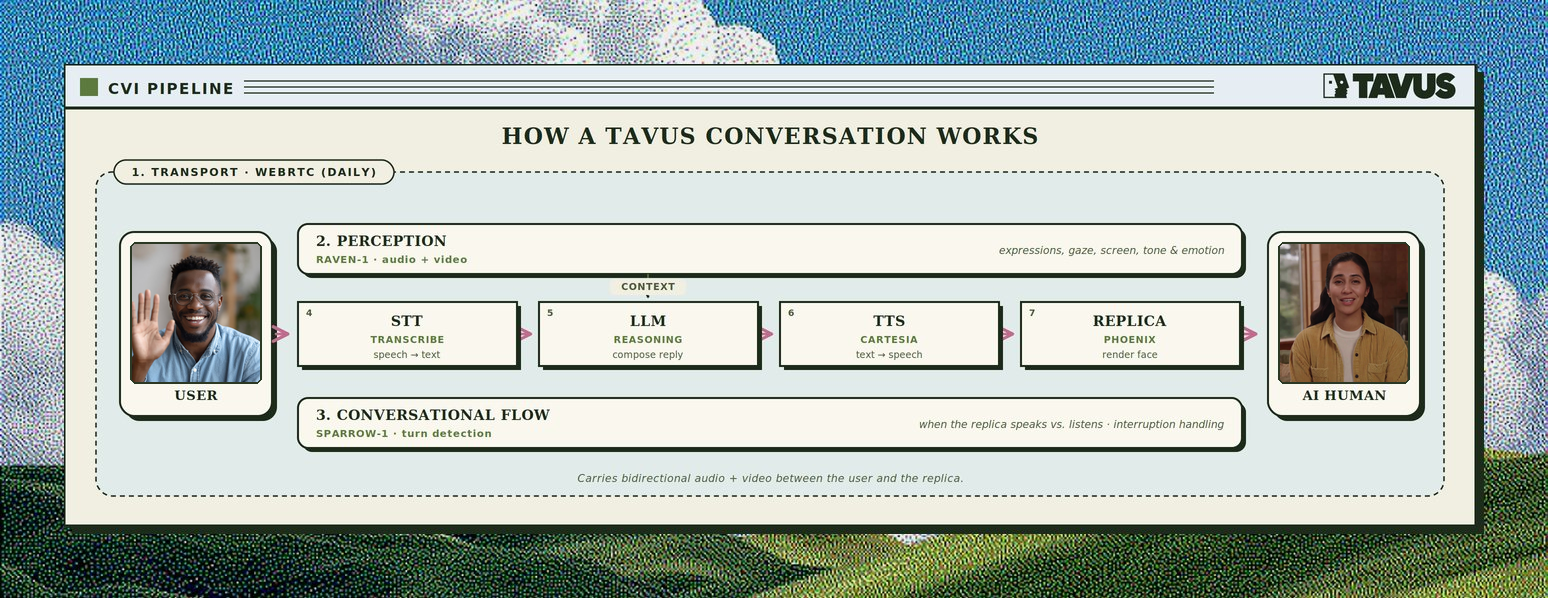 The default and recommended end-to-end configuration optimized for real-time conversation. All CVI layers are active and customizable.
* Low utterance-to-utterance latency with Tavus defaults (see [What is CVI?](/sections/conversational-video-interface/overview-cvi))
* Best for natural humanlike interactions
## Alternate Modes
These modes are incompatible with Tavus's perception and speech recognition layers. For the lowest latency and the full multimodal stack (perception, turn-taking, and rendering together), we recommend the **full Tavus pipeline** above.
### Echo Mode
Tavus also supports an [Echo mode](/sections/conversational-video-interface/echo-mode) pipeline. It lets you send text or audio input directly to the persona for playback, bypassing most of the CVI pipeline.
### Integration Modes
If you already run conversational AI on **LiveKit** or **Pipecat**, you can still use a Tavus replica for synchronized avatar video - see the dedicated guides for setup and API details.
* **[LiveKit Agent](/sections/integrations/livekit)** — Tavus renders the replica in a LiveKit room alongside a LiveKit Agents voice assistant.
* **[Pipecat](/sections/integrations/pipecat)** — Tavus joins as a transport participant or supplies video via `TavusVideoService` while Pipecat runs the pipeline on Daily.
### Custom LLM / Bring Your Own Logic
Use this mode to integrate a custom LLM or a specialized backend for interpreting transcripts and generating responses.
* Adds latency due to external processing
* Does **not** require an actual LLM—any endpoint that returns a compatible chat completion format can be used
The default and recommended end-to-end configuration optimized for real-time conversation. All CVI layers are active and customizable.
* Low utterance-to-utterance latency with Tavus defaults (see [What is CVI?](/sections/conversational-video-interface/overview-cvi))
* Best for natural humanlike interactions
## Alternate Modes
These modes are incompatible with Tavus's perception and speech recognition layers. For the lowest latency and the full multimodal stack (perception, turn-taking, and rendering together), we recommend the **full Tavus pipeline** above.
### Echo Mode
Tavus also supports an [Echo mode](/sections/conversational-video-interface/echo-mode) pipeline. It lets you send text or audio input directly to the persona for playback, bypassing most of the CVI pipeline.
### Integration Modes
If you already run conversational AI on **LiveKit** or **Pipecat**, you can still use a Tavus replica for synchronized avatar video - see the dedicated guides for setup and API details.
* **[LiveKit Agent](/sections/integrations/livekit)** — Tavus renders the replica in a LiveKit room alongside a LiveKit Agents voice assistant.
* **[Pipecat](/sections/integrations/pipecat)** — Tavus joins as a transport participant or supplies video via `TavusVideoService` while Pipecat runs the pipeline on Daily.
### Custom LLM / Bring Your Own Logic
Use this mode to integrate a custom LLM or a specialized backend for interpreting transcripts and generating responses.
* Adds latency due to external processing
* Does **not** require an actual LLM—any endpoint that returns a compatible chat completion format can be used