> ## Documentation Index
> Fetch the complete documentation index at: https://docs.tavus.io/llms.txt
> Use this file to discover all available pages before exploring further.
# Training from a Video
> Phoenix-4 video training requirements, recording structure, and quality guidelines.
To ensure the highest quality Phoenix-4 replica, your training video **must** follow the specifications outlined below.
**Phoenix-4 training requirements have changed from previous models.**
* Training now uses 30 seconds speaking + 30 seconds listening
* The listening segment must remain neutral with minimal movement
## Camera & Framing
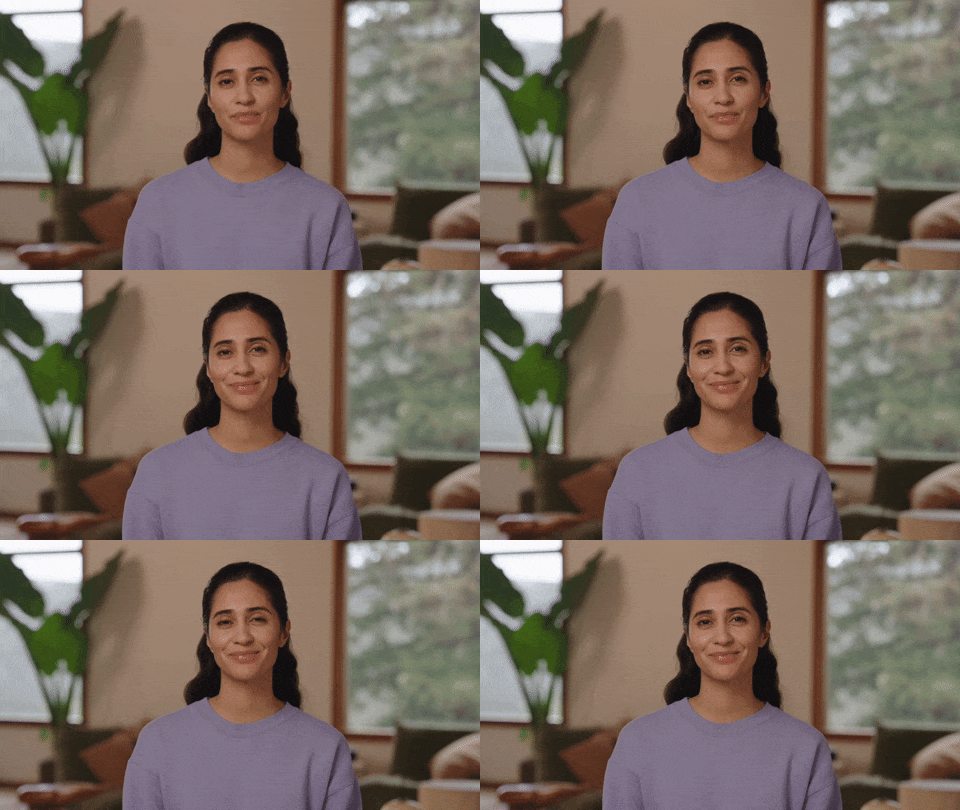
* Place the camera at **eye level** - ensure your face fills at least 25% of the frame.
* **Use a stable camera at eye level** - your face centered and clearly visible (waist-up framing)
* **Sit at least 3 feet from the camera** in a natural, Zoom-style setup - head, shoulders, and upper chest clearly visible. Ensure well-lit space with a simple background.
* **Record in 1080p using a desktop app** - avoid browser recording and low resolution cameras
* **Head & clothing separation** – keep your neck fully visible with clear separation between your head and clothing.
 ## Hair & Clothing Separation
There must be a clear visual distinction between your head and clothing, and your neck fully visible.
* **Keep your neck and jawline fully visible** with clear separation from your clothing
* **Avoid high collars or clothing that covers the neck**
* **Keep hair away from the face** and positioned behind the shoulders
* **Avoid bangs, loose strands, or complex hairstyles** that obscure the face, neck, or shoulder
## Supported Video Formats
Whether recording through the [Developer Portal](https://platform.tavus.io/dev/replicas/create) or uploading a pre-recorded training video via the [API](https://docs.tavus.io/api-reference/phoenix-replica-model/create-replica),, ensure your video meets the following requirements
* **Minimum frame rate:** 25 FPS
* **Minimum resolution:** 1080p
* **Maximum file size:** 750 MB
* **Supported formats:**`.webm` and `.mp4` (H.264 video codec + AAC audio codec)\\
## Training Data Policy
All training data uploaded to Tavus must comply with our [Terms of Service](https://www.tavus.io/terms-of-service) and [Acceptable Use Policy](https://www.tavus.io/acceptable-use-policy). Users are responsible for confirming they have permission to use any submitted content, including visual, audio, and identity-related assets. This ensures ethical use and compliance with data protection laws.\\
## Recording Structure
Your video must be **one continuous shot**, containing **30 seconds of speaking** followed by **30 seconds of still footage**. You can use a script provided by Tavus or speak on any topic of your choice.
* **Speak naturally on any topic** - the content itself does not matter
* **Speak clearly and enunciate well -** keeping your teeth visible while talking
* **Keep head and body movement minimal**
* **Avoid hand gestures or sudden head turns**
## Hair & Clothing Separation
There must be a clear visual distinction between your head and clothing, and your neck fully visible.
* **Keep your neck and jawline fully visible** with clear separation from your clothing
* **Avoid high collars or clothing that covers the neck**
* **Keep hair away from the face** and positioned behind the shoulders
* **Avoid bangs, loose strands, or complex hairstyles** that obscure the face, neck, or shoulder
## Supported Video Formats
Whether recording through the [Developer Portal](https://platform.tavus.io/dev/replicas/create) or uploading a pre-recorded training video via the [API](https://docs.tavus.io/api-reference/phoenix-replica-model/create-replica),, ensure your video meets the following requirements
* **Minimum frame rate:** 25 FPS
* **Minimum resolution:** 1080p
* **Maximum file size:** 750 MB
* **Supported formats:**`.webm` and `.mp4` (H.264 video codec + AAC audio codec)\\
## Training Data Policy
All training data uploaded to Tavus must comply with our [Terms of Service](https://www.tavus.io/terms-of-service) and [Acceptable Use Policy](https://www.tavus.io/acceptable-use-policy). Users are responsible for confirming they have permission to use any submitted content, including visual, audio, and identity-related assets. This ensures ethical use and compliance with data protection laws.\\
## Recording Structure
Your video must be **one continuous shot**, containing **30 seconds of speaking** followed by **30 seconds of still footage**. You can use a script provided by Tavus or speak on any topic of your choice.
* **Speak naturally on any topic** - the content itself does not matter
* **Speak clearly and enunciate well -** keeping your teeth visible while talking
* **Keep head and body movement minimal**
* **Avoid hand gestures or sudden head turns**
 Sample script (optional):
```txt expandable theme={null}
Once upon a time, people built a perfect park in the middle of a busy city. This park was big, bright, and full of playful paths. At sunrise, birds sang above the tall trees. Families carried baskets packed with bread, fruit, and juice.
Children skipped and shouted, chasing balls and flying paper kites. In the afternoon, people played games. Some tapped paddles and bounced plastic balls. Others kicked soccer balls back and forth, laughing loudly with every point scored.
```
* Keep your head **still** and **maintain eye contact with the camera**
* Keep lips **neutral and closed** throughout
* Do not lick lips or form unusual mouth shapes
* Avoid any head tilting or movement
Sample script (optional):
```txt expandable theme={null}
Once upon a time, people built a perfect park in the middle of a busy city. This park was big, bright, and full of playful paths. At sunrise, birds sang above the tall trees. Families carried baskets packed with bread, fruit, and juice.
Children skipped and shouted, chasing balls and flying paper kites. In the afternoon, people played games. Some tapped paddles and bounced plastic balls. Others kicked soccer balls back and forth, laughing loudly with every point scored.
```
* Keep your head **still** and **maintain eye contact with the camera**
* Keep lips **neutral and closed** throughout
* Do not lick lips or form unusual mouth shapes
* Avoid any head tilting or movement
 Replica training typically takes **3–4 hours**. You can track the training progress by:
* Providing a `callback_url` when creating the replica via API
* Using the **Get Replica Status**
API
* Checking the Developer Portal
### High-Quality Training Example
| ✅ Do | ❌ Don’t |
| :----------------------------------------------------------- | :-------------------------------------------------- |
| ✅ Keep your full face visible and in focus | ❌ Wear clothes that blend into the background |
| ✅ Keep hair and loose strands behind your shoulders and face | ❌ Wear accessories (hats, glasses, jewelry, etc.) |
| ✅ Sit still, facing the camera | ❌ Move around or change positions |
| ✅ Speak clearly with good enunciation (teeth fully visible) | ❌ Block your face or mouth with hands or microphone |
| | |
## Full Body Replica
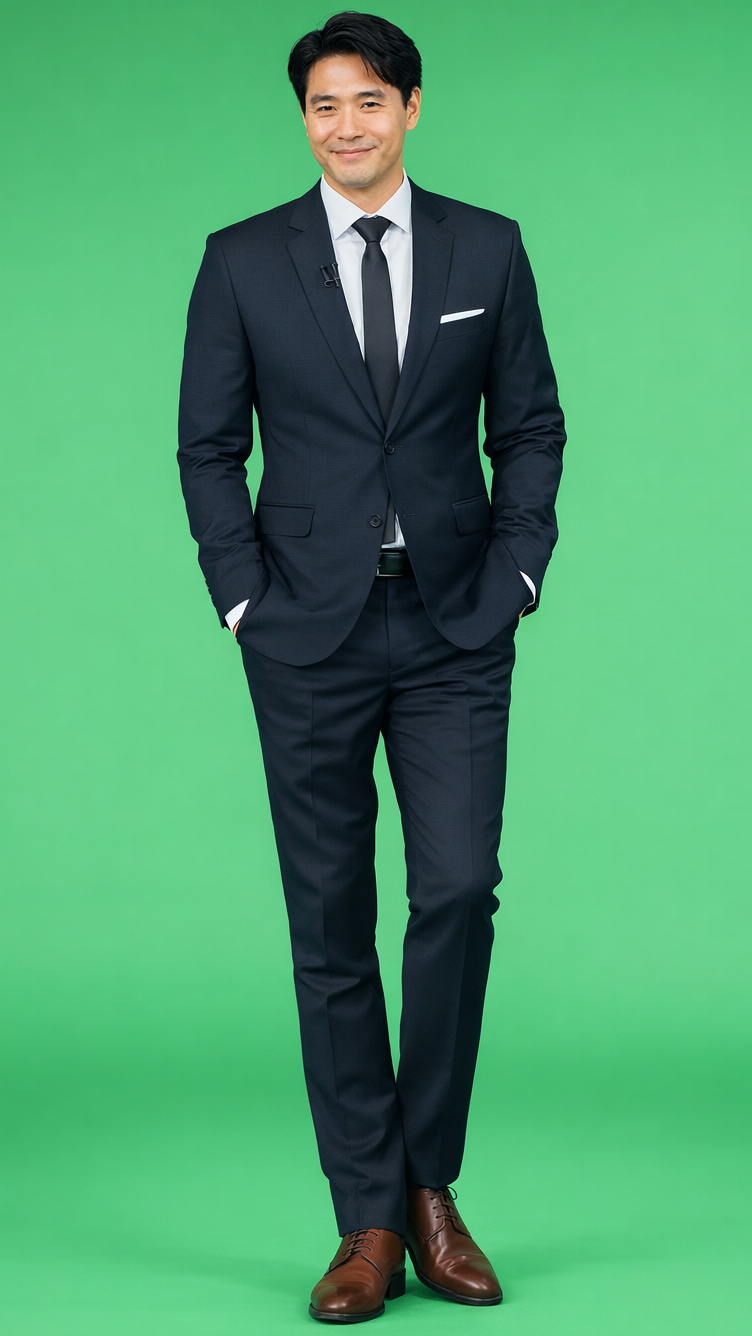
To create a full body replica for conversational video, follow these guidelines.
* **Record in vertical format**, with the full body visible from head to toe
* **Stand still throughout the recording** and avoid large movements or hand gestures
* **Use consistent lighting** with minimal shadows or exposure changes
* **4K resolution is recommended** for best quality
Replica training typically takes **3–4 hours**. You can track the training progress by:
* Providing a `callback_url` when creating the replica via API
* Using the **Get Replica Status**
API
* Checking the Developer Portal
### High-Quality Training Example
| ✅ Do | ❌ Don’t |
| :----------------------------------------------------------- | :-------------------------------------------------- |
| ✅ Keep your full face visible and in focus | ❌ Wear clothes that blend into the background |
| ✅ Keep hair and loose strands behind your shoulders and face | ❌ Wear accessories (hats, glasses, jewelry, etc.) |
| ✅ Sit still, facing the camera | ❌ Move around or change positions |
| ✅ Speak clearly with good enunciation (teeth fully visible) | ❌ Block your face or mouth with hands or microphone |
| | |
## Full Body Replica
To create a full body replica for conversational video, follow these guidelines.
* **Record in vertical format**, with the full body visible from head to toe
* **Stand still throughout the recording** and avoid large movements or hand gestures
* **Use consistent lighting** with minimal shadows or exposure changes
* **4K resolution is recommended** for best quality
 All standard recording requirements for replica training still apply.