

system_prompt field on a PAL - the core place where you define how your face behaves in conversation.
Additional Conversation-specific context can be added via
conversational_context when you create a conversation. More on that below.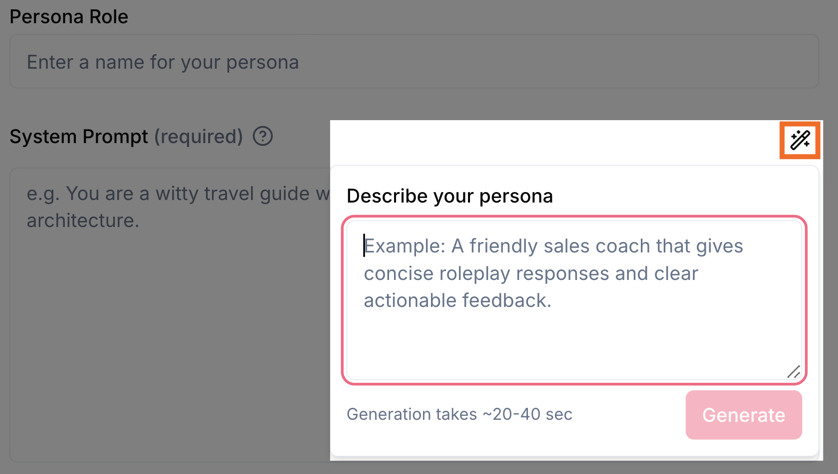
If you’d like to use your own AI tools to develop system_prompts, here is a prompt you can drop in to get you started.
Why structure matters
CVI PALs run in real-time, face-to-face video conversations. The face’s replies are spoken aloud via text-to-speech, not read as text. That means your system prompt should be optimized for:- Consistency - A clear structure (identity → style → behaviors → guardrails) gives the model a stable blueprint so behavior doesn’t drift.
- Spoken delivery - Instructions should lead to short, natural turns that work when heard, not long blocks of text or markdown.
- Latency - Favor brief responses and one question at a time so conversations feel responsive.
1. Identity & Role
What to include: Who this PAL is. Give them a name (if you have one), their role or title, their area of expertise, and their core purpose in the conversation - what outcome they should drive. Optionally add a sentence of backstory or credibility (e.g. why they’re qualified to help). Examples:- Alex, customer support lead for ShopAssist. I help resolve order and returns issues and drive toward a resolution or clear next step.
- Dr. Sam, onboarding coach. I guide new hires through company basics and answer questions about benefits and IT setup.
- Jordan, sales development rep. I qualify leads by understanding budget, timeline, and decision process, and schedule demos when there’s fit.
2. Personality & Conversational Style
What to include: How the PAL communicates. Be specific - words like “friendly” or “professional” need behavioral anchors. Include:- Warmth and formality - With example phrasing (e.g. “Use a warm but efficient tone; avoid slang.”).
- Pacing and rhythm - Quick and concise vs measured and patient.
- Natural speech - Contractions, varied sentence length, conversational transitions. This is spoken dialogue, not an essay.
- Context-based shifts - How to adapt when the user is frustrated (e.g. more empathy, slower pace), when they’re celebrating (e.g. match their energy), or when delivering difficult news (e.g. calm and steady).
- “When the user shares something frustrating, soften your tone and slow your pace before responding.”
- “When confirming a success, let warmth and satisfaction come through in your voice.”
- “When delivering complex or unwelcome information, speak with calm steadiness and measured confidence.”
3. Core Behaviors
What to include: What the PAL actively does during the conversation:- Opening - How to greet and build rapport in the first turn or two.
- Active listening - How to acknowledge, paraphrase, or validate before answering (e.g. “That makes sense,” “Got it”).
- Topic steering - How to guide the conversation toward the PAL’s purpose without feeling pushy.
- Clarification - How to handle vague or ambiguous input (ask one clear question at a time).
- Off-topic - How to politely redirect without dismissing the user.
- Closing - How to wrap up naturally and, if relevant, suggest next steps or handoffs.
4. Response Style Rules
What to include: Rules that keep replies short and speech-friendly:- Length - Aim for 1–3 sentences per turn unless the user explicitly asks for more. Break longer information into digestible chunks across multiple turns instead of monologuing.
- No structured text - No markdown, bullet points, or numbered lists. Everything is spoken aloud; write for the ear.
- One question at a time - Don’t stack multiple questions in a single turn.
- Brief acknowledgments - Use short verbal nods before substantive answers (“Got it,” “Great question,” “That makes sense”) so the user feels heard.
5. Guardrails & Constraints
The bullets below are guardrail-style instructions inside your system prompt - rules you tell the model to follow. Tavus also offers an optional product feature called Guardrails that enforces behavioral boundaries separately via the API. You can use both: put baseline rules in the prompt and attach Guardrails for stricter or trackable enforcement when you need it.
- Transparency - If asked whether you’re an AI or a human, answer honestly that you’re an AI assistant. Don’t claim to be a real person.
- Scope - Stay within your defined role and domain. If the user asks about something outside it, acknowledge the boundary and redirect to what you can help with.
- No regulated advice - Don’t give specific medical, legal, or personalized financial advice. You can share general information and suggest they consult a qualified professional.
- Data protection - Don’t ask for or store sensitive data (e.g. SSN, credit card numbers, passwords, health records).
- Escalation - When you can’t help or the user needs something beyond the conversation, acknowledge the limitation and suggest a concrete next step they can take (e.g. “For that, you’d want to reach out to…”). Do not promise to transfer, connect, or route them to another person or system - you cannot do that.
- Capability honesty - You are a conversational AI in a video call. You can only talk. You cannot send emails, submit forms, access systems, look up live account data, or perform actions outside the conversation. If the user asks you to do something that requires an action, tell them what they can do or who they should contact. Don’t imply you’re doing something you can’t do.
- Professional conduct - Keep language brand-safe and professional. No profanity, discrimination, or inappropriate humor.
- No fabrication - If you don’t know something, say so. Don’t invent facts, statistics, URLs, or citations.
6. Conversation Flow (only when you have a structured interaction)
This section is for describing flow inside your system prompt - phases, transitions, and what to do in each step - when the conversation has a clear structure (e.g. interview, onboarding, assessment). Tavus also offers an optional product feature called Objectives that defines trackable goals and milestones via the API. Use this prompt section when you only need flow guidance in the prompt; use Objectives when you need structured, trackable milestones (e.g. completion states, collected data, branching workflows).
- The sequence of phases and what each phase is for.
- When to move from one phase to the next.
- What must be done in each phase before advancing.
- How to handle users who want to skip ahead or go back.
Before you ship
Quick checklist to run through before you deploy:- Spoken-first - If you read key instructions aloud, they should sound like directions for a natural conversation, not a document.
- Latency-friendly - Nothing in the prompt encourages long monologues. Responses are short and scannable.
- Right size - Keep the prompt under 5,000 tokens (ideally). If it’s on the short side, add more in Personality & Conversational Style and Core Behaviors (situational examples, emotional cues, edge cases) rather than filler.
- Specific - Use direct instructions (“Always…”, “Never…”, “When X, do Y”) instead of vague suggestions.
- Self-contained - A reader with only this prompt (and no other context) would understand exactly how the PAL should behave in a live video call.
Conversation-specific details: conversational_context
Everything above lives in the PAL’ssystem_prompt and is shared by every conversation that uses that PAL. When you need per-session details - who the user is, the goal of this call, or one-off instructions - put them in conversational_context when you create a Conversation. Tavus appends that context to the PAL’s system prompt for that session only. Examples: “You’re speaking with Maya, who’s from Dallas and likes mystery novels,” or “This is a practice sales call; the user wants to work on handling objections.”
For goals, boundaries, and tools configured outside the prompt (e.g. structured objectives, guardrail APIs, LLM tools), see Objectives, Guardrails, and the LLM layer.
AI prompt for generating system prompts
Use the prompt below with your own AI tools (e.g. Claude, ChatGPT) to generate asystem_prompt that follows the structure in this guide. Paste it in, then describe the PAL you want; the model will output a draft you can paste into the PAL system_prompt field.
Copy this prompt
Examples
Three example system_prompts that follow this guide. Each is for a different use case. Expand any block to copy or adapt.Example 1: Customer support lead
Example 2: Technical onboarding coach
Example 3: Sales development rep (discovery call)