

model_name: phoenix-4 and train_image_url. The image must be at a publicly accessible URL (for example a presigned S3 GET URL). You also attach a voice.
See Choose a Model and Training Path if you are still deciding. For Phoenix-4.5 photos, see Phoenix-4.5 Image Requirements.
Phoenix-4 faces are ready when training finishes, typically 3–4 hours.
Image requirements
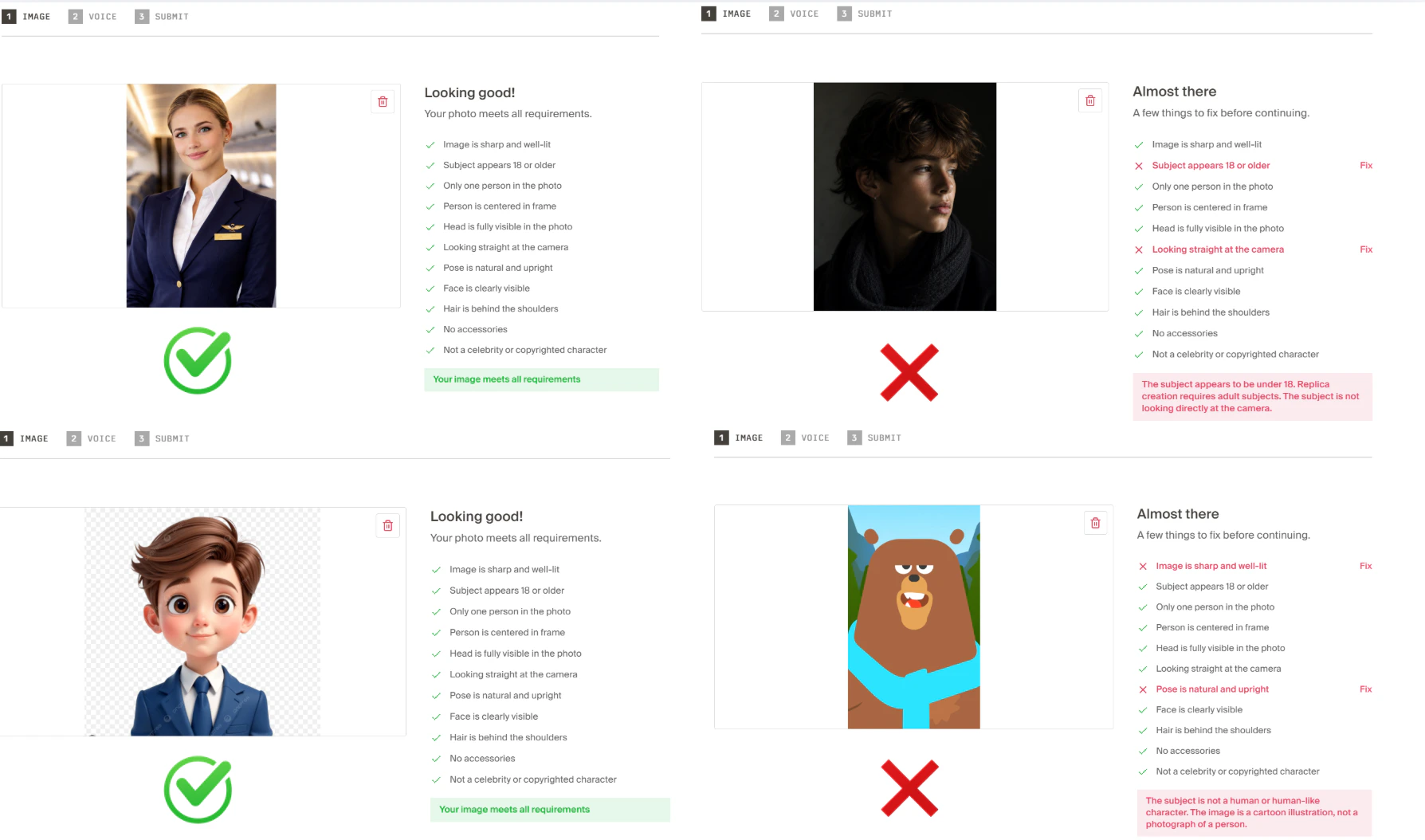
Phoenix-4 uses a stricter checker than Phoenix-4.5.- Formats: JPG or PNG
- Minimum resolution: 512×512 pixels
- Only one person visible in the image
- Subject is an adult (18+)
- Human-shaped subject: realistic, cartoon, anime, and Pixar-style faces are all fine. Animals, mascots, and other non-human figures are not
- Head fully in frame, subject centered, looking straight at the camera
- Upright, neutral pose (not leaning, lying down, or mid-gesture)
- Face not blocked by hands, phones, masks, or heavy hair over the eyes and nose
- Even lighting with minimal shadows across the face
- Not a household-name public figure or an obvious copyrighted character
- Head and shoulders clearly visible
- No glasses, face-covering accessories, or over-ear headphones
- Avoid visible jewelry such as large earrings or necklaces
- Keep hair behind the shoulders and away from the face and neck (no tall hairstyles that stack high above the face)
- Neck visible (avoid turtlenecks, high collars, or hair covering the front of the neck)
- Sleeves or wide straps (strapless and spaghetti straps fail)
- No dense beard covering the neck or collar
Attach a voice
A photo has no audio, so nothing gets cloned the way it does on the video path. Send a voice on the same Create Face request - a stock voice or one you train yourself. See Voices for Image-Based Faces.AI Image Fixer
If your uploaded image doesn’t fully meet these requirements, setauto_fix_training_image to true when calling Create Face. Tavus’s AI Image Fixer adjusts the uploaded image to fit. Some policy failures (for example under-18 or copyrighted characters) cannot be auto-fixed.