

model_name: phoenix-4.5 and train_image_url. The image must be at a publicly accessible URL (for example a presigned S3 GET URL). You also attach a voice.
See Choose a Model and Training Path if you are still deciding. For Phoenix-4 photos, see Phoenix-4 Image Requirements.
A zero-shot preview becomes usable in about a minute. The preview carries a visible watermark burned into the video. Tuning continues in the background for a few hours; the later tuned version does not carry the watermark.
Image requirements
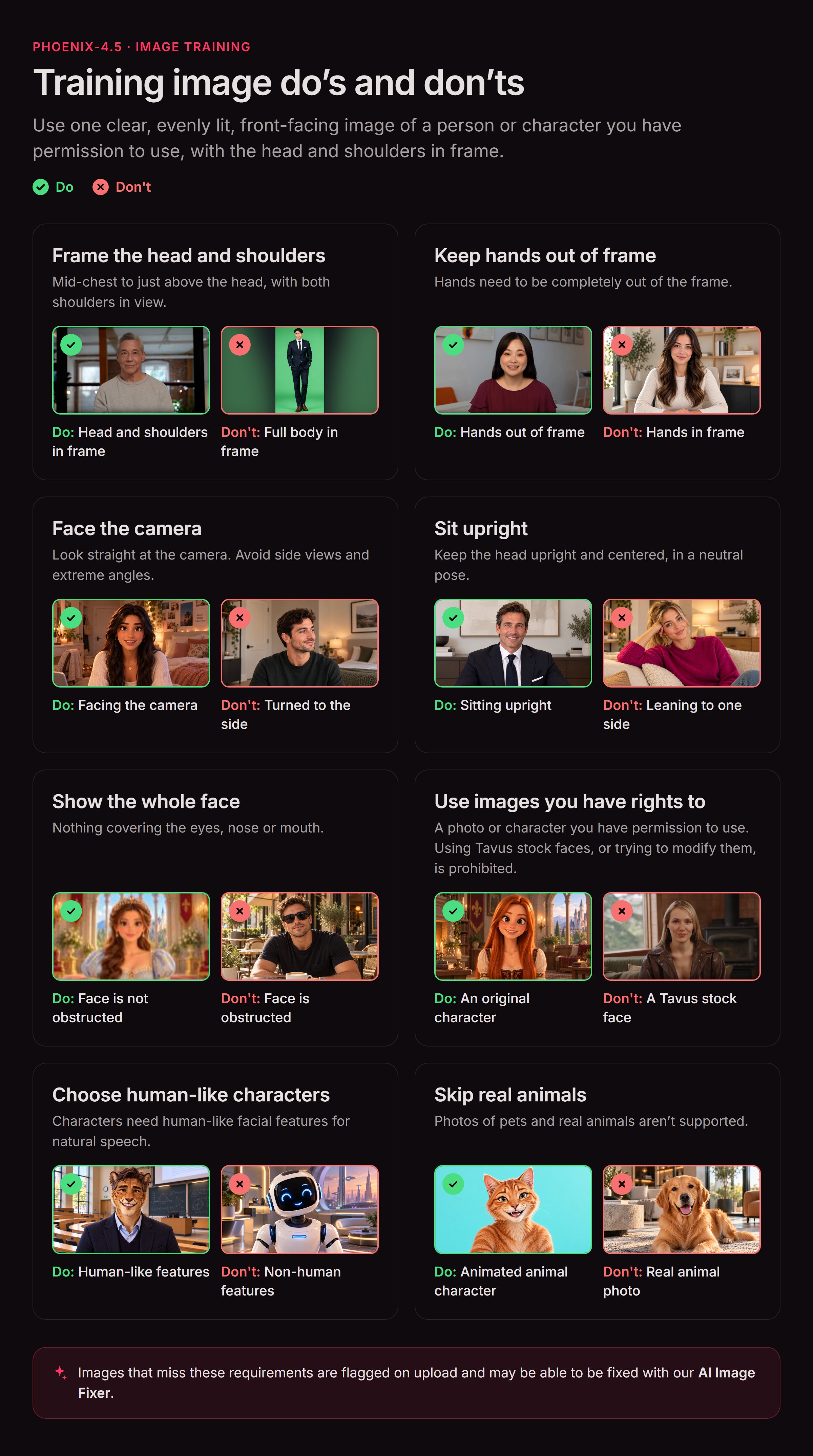
Phoenix-4.5 works best as a chest-up portrait: mid-chest to just above the head, subject roughly centered with a little headroom, both shoulders in frame. Slightly wider (waist-up) or slightly closer both work. The face must stay fully visible and unobstructed. Full body is not supported on Phoenix-4.5; use Phoenix-4 for head-to-toe.- Formats: JPG or PNG
- Minimum resolution: 512×512 pixels
- Only one person visible in the image
- Subject is an adult (18+)
- Human-shaped subject: realistic, cartoon, anime, and Pixar-style faces are all fine. Animals, mascots, and other non-human figures are not
- Head fully in frame, subject centered, looking straight at the camera
- Upright, neutral pose (not leaning, lying down, or mid-gesture)
- Face not blocked by hands, phones, masks, or heavy hair over the eyes and nose
- Even lighting with minimal shadows across the face
- Not a household-name public figure or an obvious copyrighted character
- Do not send full-body, head-to-toe shots
- Keep arms relaxed and lowered, mostly out of frame (no raised or prominent arms)
- Glasses, jewelry, headphones, and hair in front of the shoulders are allowed as long as they do not cover the face. Shorter, crisp beards that leave the mouth and teeth visible work best - results may vary with dense or long beards.
Attach a voice
A photo has no audio, so nothing gets cloned the way it does on the video path. Send a voice on the same Create Face request - a stock voice or one you train yourself. See Voices for Image-Based Faces.AI Image Fixer
If your uploaded image doesn’t fully meet these requirements, setauto_fix_training_image to true when calling Create Face. Tavus’s AI Image Fixer adjusts the uploaded image to fit. Some policy failures (for example under-18 or copyrighted characters) cannot be auto-fixed.